Get live form feedback and an automatic rep count from your iPhone camera.
Prop your phone up and start a set. TrainTogether tracks your body on the device, scores your form and counts the reps. No account is needed.
View TrainTogether on the App Store
iPhone, iOS 18 or later. Free, with optional Pro. Camera-based workouts, rep counting and form feedback are available free. Optional Pro plans expand AI usage. Check the app for your current allowance and available offers. Check the App Store for local prices.
Form feedback while you move
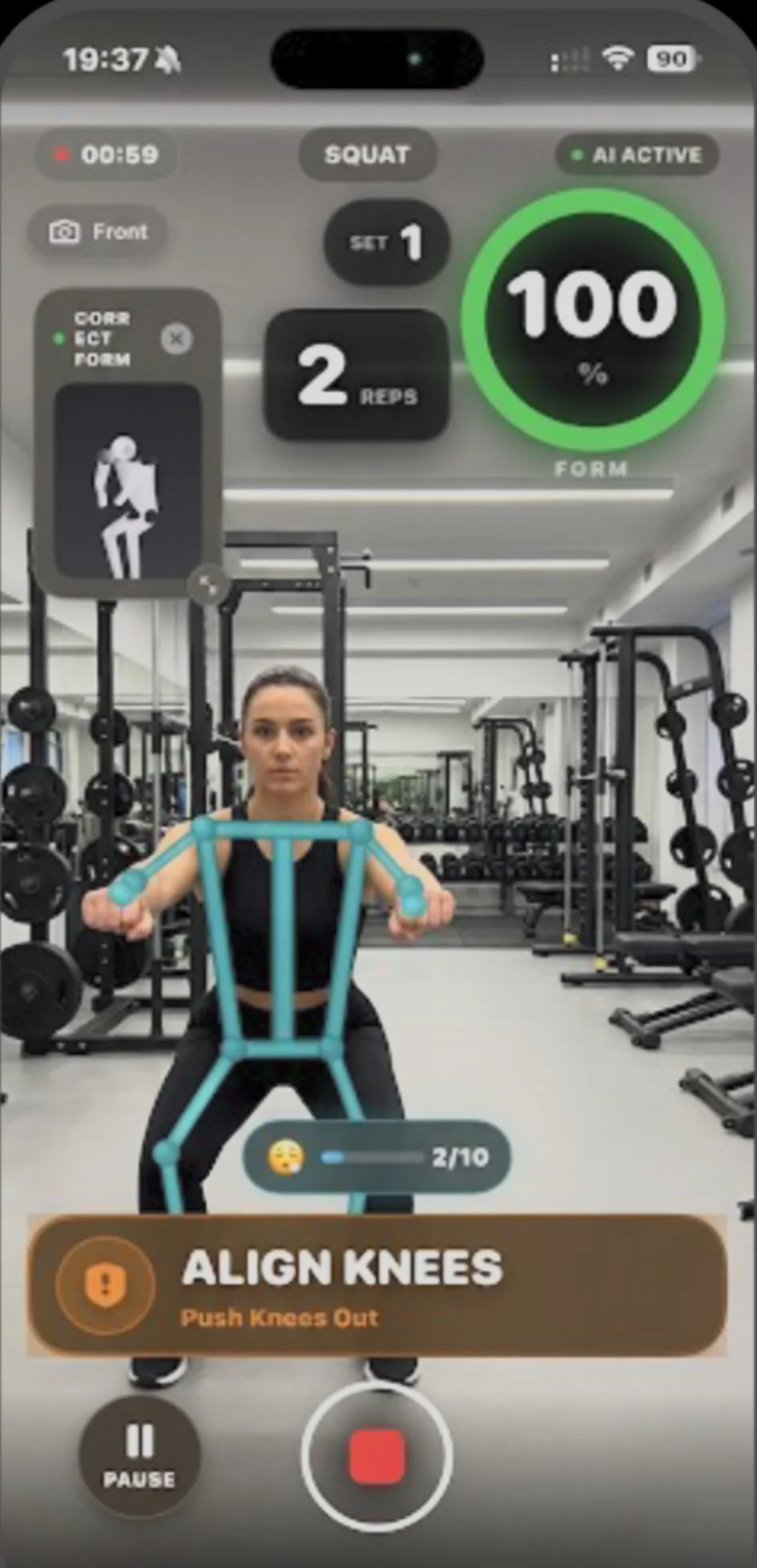
Pose detection runs on your iPhone. For each supported exercise you get a live form score, an on-body overlay that compares your position with the ideal form, and a short cue each time it spots a fault, such as a prompt to push your knees out during a squat. On the free tier a cue names the fault and the sentence explaining how to fix it is part of Pro. Stop-and-reset safety prompts are never locked. In version 3.1, the real-time pose overlay follows movement more smoothly and highlights areas to adjust.
- Live form score and on-body overlay
- A cue for each fault; the how-to-fix detail is Pro
- Each supported exercise has its own rep counter and form check
Rep counting without tapping
Reps are counted automatically from the camera view, so your hands stay free. Counting works best with your full body in frame, even lighting and the camera at about the angle the on-screen guide suggests.
- Hands-free counting
- Camera workouts work offline
Coach and nutrition, both optional
A chat coach runs on your iPhone using a language model that downloads once, the first time you open it; after that it works offline. Food can be logged by hand, by barcode or, if you switch it on, by photo.
- Manual and barcode food logging are not limited by the scan allowance
- Current AI coaching and food-scan allowances appear in the app.
Privacy: what leaves your phone
Camera frames are analysed on your phone and are not uploaded. If you choose to record a session, the recording goes to your photo library only. Workouts and settings stay on your device, with optional private iCloud sync. The food-photo scanner is off by default; if you turn it on, only the food image is sent, through a proxy, to Google's Gemini model to estimate calories. The App Store privacy label reads "Data Not Collected".
Practical details
- Counting and scoring can be wrong. Partial or very fast reps can be undercounted, and accuracy drops when key joints leave the frame.
- Detailed form insights are part of TrainTogether Pro. The in-app Pro screen lists exactly what is included.
- It is a coaching aid, not medical advice. It does not diagnose injuries or promise to prevent them.
- Tracking needs your full body in view, so you need some space and a way to prop up the phone.
- Camera access is required for live workouts.
Questions
Is my workout video uploaded anywhere?
No. Camera frames are analysed in real time and discarded. If you record a session, it is saved to your photo library only, and only with your permission.
Which exercises are supported?
Open the Workout tab to see the exercises supported in your version. Each one has its own rep counter and form check. This page does not list them because the set changes between releases.
Does it work offline?
Camera workouts, rep counting, form analysis and manual or barcode food logging work offline, as does the coach once its model has downloaded. Food-photo scanning, Apple Health and iCloud sync need a connection.
How much does it cost?
Camera-based workouts, rep counting and form feedback are available free. Optional Pro plans expand AI usage. Check the app for your current allowance and available offers. Check the App Store for local prices.
Which devices does it run on?
iPhone with iOS 18 or later. Version 3.0 also added Apple Watch workouts, which need watchOS 10 or later.
View TrainTogether on the App Store
Last verified 2026-11-18 against: App Store version history and app listing (v3.1.1) for current availability and purchase options; app source and support material for technical details..