Scan your rooms, tag what is inside, and find any item later.
Seekr turns a LiDAR room scan into a searchable map of your furniture, containers and belongings. It is free to download, and your data stays on your device unless you switch on iCloud.
iPhone or iPad, iOS 18 or later; scanning a new room needs a LiDAR sensor. Free, with optional Pro. Seekr lets you scan rooms and track up to 25 items for free. Pro offers an annual subscription or a lifetime purchase and unlocks unlimited items, reports, iCloud backup and sharing, whole-home 3D, AR guidance, and receipt scanning. Buyers of the earlier paid app keep Pro. Check the App Store for local prices.
Scan a room with LiDAR
Walk slowly around a room and Seekr uses Apple's RoomPlan to capture walls, doors, windows and recognised furniture as an editable 3D floor plan. Most rooms take a few minutes.
- Unlimited room scans on the free tier
- An editable 3D model of each room
- Merge scanned rooms into a whole-home model (Pro)
Tag furniture, containers and items
Organise what you own in three levels: furniture such as a desk, a container such as the top drawer, and an item such as a passport. Add items by hand, by barcode or with a photo, and place their tags in the 3D model.
- Furniture, container, item hierarchy
- Barcode and photo entry
- Reminders for expiry, low stock, warranties and return deadlines
Search, then go to the item
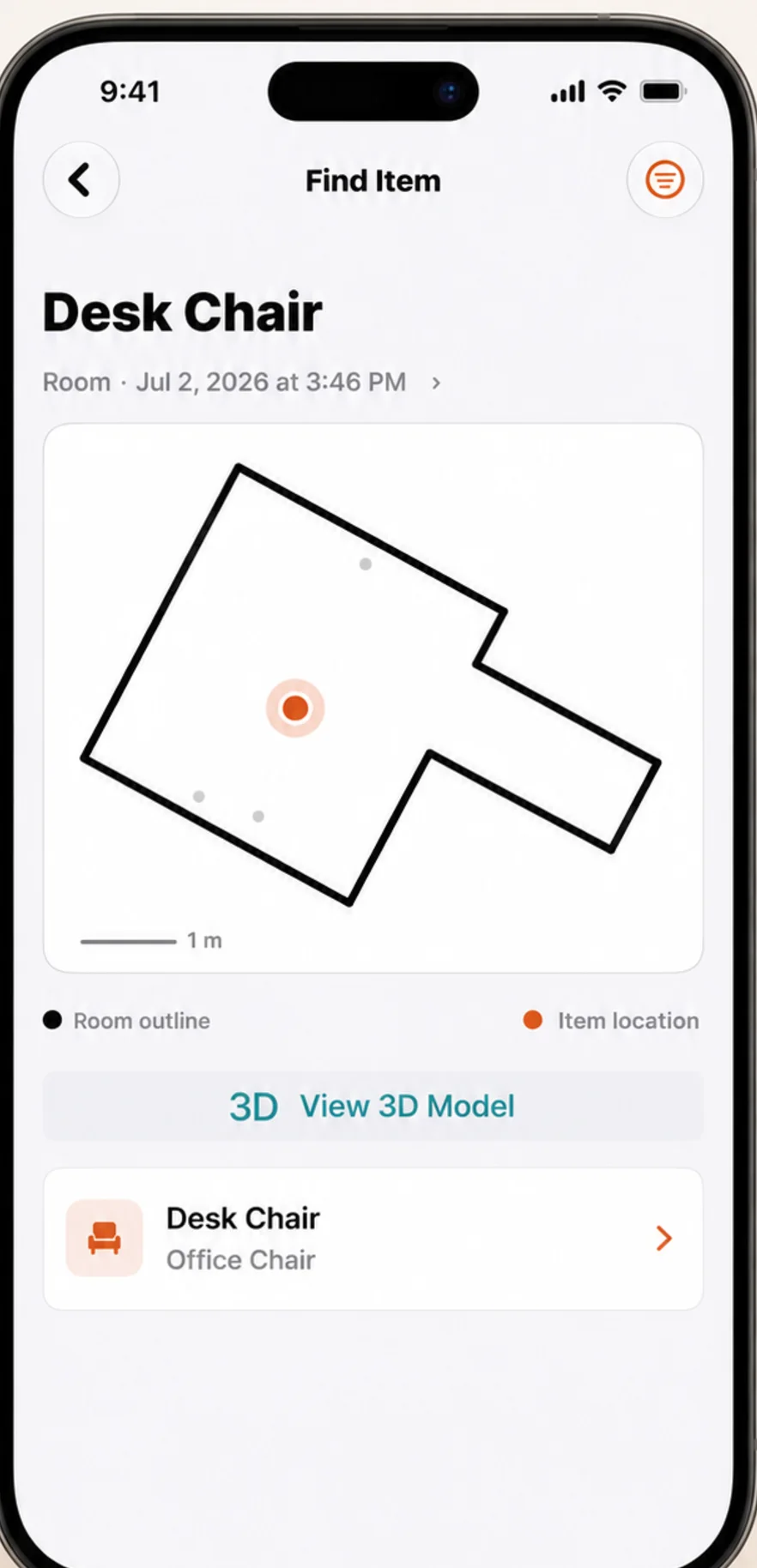
Search covers every space at once and shows each result with its full location path. The Find Item screen marks where the item sits on the room outline and links to the 3D model. AR guidance that walks you to the item is a Pro feature.
What is free and what is Pro
The free tier covers unlimited room scans and up to 25 items, plus search, CSV and archive export and iCloud restore. Seekr Pro unlocks unlimited items, PDF and insurance-claim reports, iCloud backup, household sharing, the whole-home 3D model, AR guidance and receipt scanning.
Privacy
By default your 3D room models, AR world maps and tag photos stay on your device. iCloud Backup and Household Sharing are off until you turn them on, and syncing between your own devices happens directly over your local Wi-Fi. The App Store privacy label reads "Data Not Collected".
Practical details
- Scanning a new room needs a LiDAR sensor: an iPhone 12 Pro or later Pro or Pro Max model, or an iPad Pro with LiDAR. On other devices you can still browse and manage spaces that were already scanned.
- The free tier holds 25 items. Beyond that you need Seekr Pro.
- AR guidance, the whole-home 3D model, PDF and insurance reports, iCloud backup, household sharing and receipt scanning are Pro features.
- Household sharing sends a space's name, tags and tag photos, not the full 3D model.
Questions
Do I need a LiDAR iPhone?
To scan a new room, yes. Without LiDAR the Scan button is disabled, but you can still browse and manage any spaces already scanned.
Is Seekr free?
Seekr lets you scan rooms and track up to 25 items for free. Pro offers an annual subscription or a lifetime purchase and unlocks unlimited items, reports, iCloud backup and sharing, whole-home 3D, AR guidance, and receipt scanning. Buyers of the earlier paid app keep Pro. Check the App Store for local prices.
I bought the paid version earlier. Do I lose anything?
No. Buyers of the paid version keep every feature automatically. If Pro does not appear, open Settings, then Seekr Pro, then Restore Purchases while online.
Is my data uploaded?
Not by default. Everything stays on your device until you turn on iCloud Backup or Household Sharing.
Can I use it on more than one of my devices?
Yes. Open Settings, then Sync, on each device. They discover each other over your local Wi-Fi and transfer spaces directly, with no account.
Last verified 2026-11-18 against: App Store version history and app listing (v3.1) for current availability and purchase options; app source and support material for technical details..