See your film-inspired look through the viewfinder before you press the shutter.
DigiMimic is a manual camera for iPhone with exposure dials, focus tools and film-inspired looks previewed live in the viewfinder. Everything stays on your device.
View DigiMimic on the App Store
iPhone or iPad, iOS 17 or later. Free, with optional Pro. DigiMimic is free to download. Optional Pro is available weekly, annually, or as a lifetime purchase and unlocks all looks, RAW and high-resolution capture, pro video, Camera Assist, and Gallery tools. Buyers of the earlier paid app keep Pro. Check the App Store for local prices.
Looks you can see before you shoot
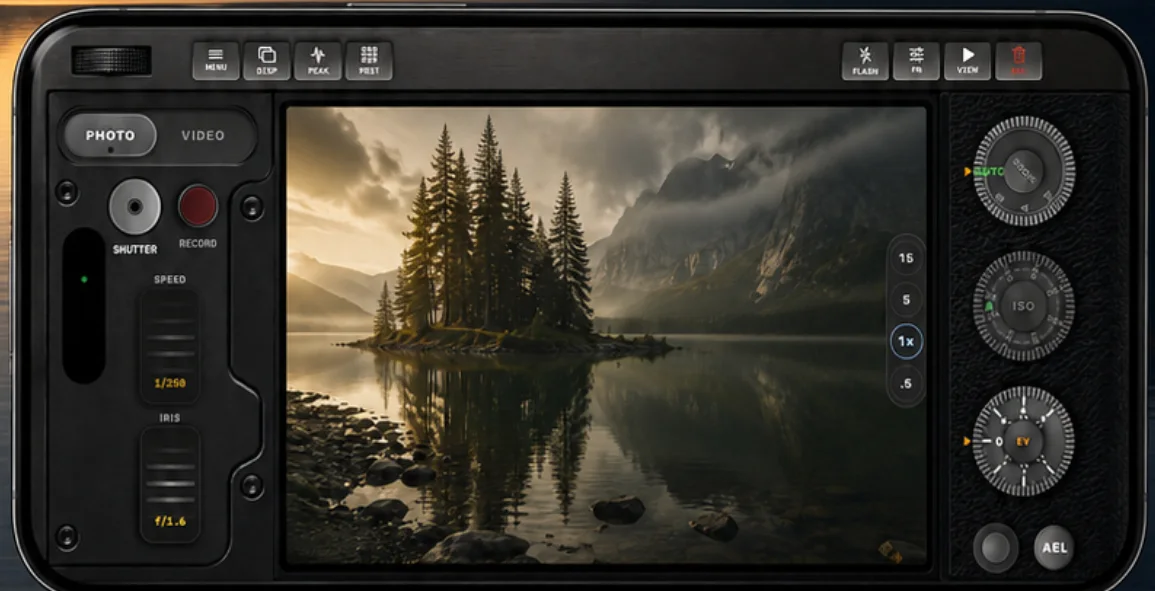
Choose a look from the LCD panel and the live viewfinder applies it as you frame the shot, with an adjustable intensity, on photos and on video. Nine looks are free. The rest of the bundled looks, and importing your own .cube LUT files, need DigiMimic Pro. In the Gallery you can review, cull and re-grade what you captured.
- Nine free looks, from clean to film-inspired
- Import your own .cube LUTs (Pro)
- Exposure, highlights, shadows, whites, blacks, temperature, tint, vibrance and saturation
- Grain, vignette and halation for film texture
A manual camera, not a filter app
The interface is a landscape camera body with an exposure dial for Auto, P, A, S and M modes, a shutter button and a readout of the active lens. Focus tools include peaking, a 3x focus loupe and A/B focus pulls while you record.
- Free: single shots, 2 and 10 second timers, HEIF photos at 12 MP
- Free: 1080p video below 60 fps
- Pro: RAW, burst, exposure and focus bracketing, 24 MP detail photos, 4K and 60 fps video
What costs extra
Free gives you nine looks, HEIF photos at 12 MP, 1080p video below 60 fps, single shots and timers, the 3:2, 4:3, 1:1, 16:9 and 9:16 crops, and the default camera body. DigiMimic Pro unlocks the rest: every bundled look, your own .cube LUTs, RAW, 24 MP detail photos, 4K and 60 fps video, burst and bracketing, the 5:4, 2:1, 21:9 and 65:24 crops, the other camera-body themes, and the AI tools the App Store lists (Camera Assist and Gallery AI). Pro is offered as an annual plan with a 7-day trial for new subscribers, a weekly plan, or a one-time lifetime purchase, and existing buyers keep Pro unlocked. Subscriptions renew automatically unless cancelled at least 24 hours before the period ends.
Privacy
There is no account or sign-up, and the app works offline. Photos and videos are saved to your Photos library. Camera, microphone and Photos access are requested when a feature needs them, and location only if you turn on geotagging. The App Store privacy label reads "Data Not Collected".
Practical details
- The interface is landscape only and styled as a camera body.
- Importing .cube LUTs, RAW, 4K and 60 fps video, burst and bracketing, and the wider crops need DigiMimic Pro.
- The looks are film-inspired emulations. They approximate a style and are not official profiles from any camera maker.
- In hot conditions or under heavy load the app can show warnings (WARM, HOT, LOAD, PRESS) so you can manage system load.
Questions
Can I use my own LUTs?
Yes, with DigiMimic Pro. Pro lets you import .cube LUT files and apply them to photos and video with an adjustable intensity. The free tier includes nine bundled looks.
Does it need an account?
No. There is no sign-up and no onboarding tutorial to get through.
Does it work offline?
Yes. Your captures are saved to your Photos library on the device.
How much does it cost?
DigiMimic is free to download. Optional Pro is available weekly, annually, or as a lifetime purchase and unlocks all looks, RAW and high-resolution capture, pro video, Camera Assist, and Gallery tools. Buyers of the earlier paid app keep Pro. Check the App Store for local prices.
Which devices does it run on?
iPhone and iPad on iOS or iPadOS 17 or later.
View DigiMimic on the App Store
Last verified 2026-11-18 against: App Store version history and app listing (v3.1) for current availability and purchase options; app source and support material for technical details..