Import and review
Choose photos from Photos or Files and see them as pictures first. Already-imported photos are marked and skipped.
Photo editing & film · iPhone, iPad
Edit the light. Then develop it on film.
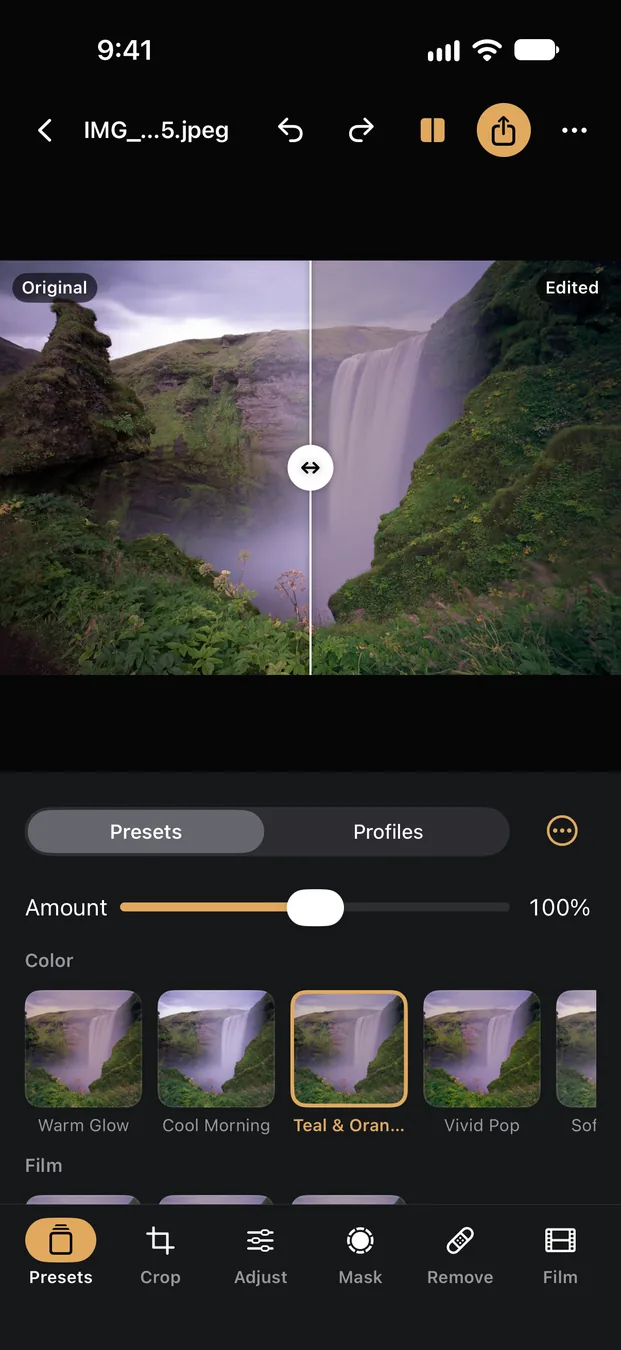
Spectra edits RAW and JPEG photos like a desktop editor, then carries the result on to a simulated film stock and paper, with grain and halation, all on the device.
01
A photo editor usually stops at the digital edit. Spectra keeps going: once the light and colour are right, it exposes, develops, and prints the photo on a film stock, so the grain and the colour come from the film and the paper rather than from a filter.
02
Joined two open-source engines into one iPhone and iPad app: LightCraft for the library, RAW development, masks, and healing, and a C++ and Metal film simulation ported from spektrafilm. The photo moves from one to the other as a single pipeline.
Wrote a Rust bridge with a C interface so SwiftUI can drive LightCraft’s commands and render jobs, including a live preview of every preset on the photo in front of you.
Reduced the interface to three tabs and one editing dock that never leaves the screen. Light, colour, masks, retouching, and the film tools share one slider and one style of selection.
Added a render scheduler that watches the memory the system allows the app, so large photos render and export without the app being closed.
Choose photos from Photos or Files and see them as pictures first. Already-imported photos are marked and skipped.
Adjust light, colour, detail, and lens blur, paint masks for just part of the photo, and compare before and after with a draggable split.
Choose a film stock and paper, set the frame and the finish, and export the film look or the digital edit straight to Photos.
Spectra runs both engines on the device and sends nothing to a server. The photo goes through LightCraft first, then through the film.
03
Spectra runs on iPhone and iPad simulators with the full pipeline, from import and editing to film and export to Photos, and its film engine is shared with a Mac app. The pictures on this page are from the app running in the iPhone simulator. It is free with an optional one-time purchase that removes ads, and it has no App Store release date yet.
Core stack
Spectra support

The studio
Every page here is on the computer in that room.
Enter the studio