
Track your habits and your everyday spending in one private iPhone app.
HabitForge keeps habits, streaks and an expense log side by side. Everything is stored on your phone: there is no account to create.
View HabitForge on the App Store
iPhone, iOS 15.1 or later (Home Screen widgets need iOS 18 or later). Free, with optional Pro. HabitForge is free to download. A one-time Pro purchase unlocks unlimited habits, the full finance tools, calendar export, the expense widget, all themes, and AI features. Check the App Store for local prices.
Habits you can keep
Create a habit, choose which days of the week it repeats on and a time, and check it off from Today. Each habit has a 30-day grid, a streak and a total-completions count. Reminders are optional and are turned on in Settings.
- Pick the days each habit repeats on, and a time
- A 30-day grid, streak and total completions per habit
- Optional reminders, set in Settings
Spending, without linking a bank
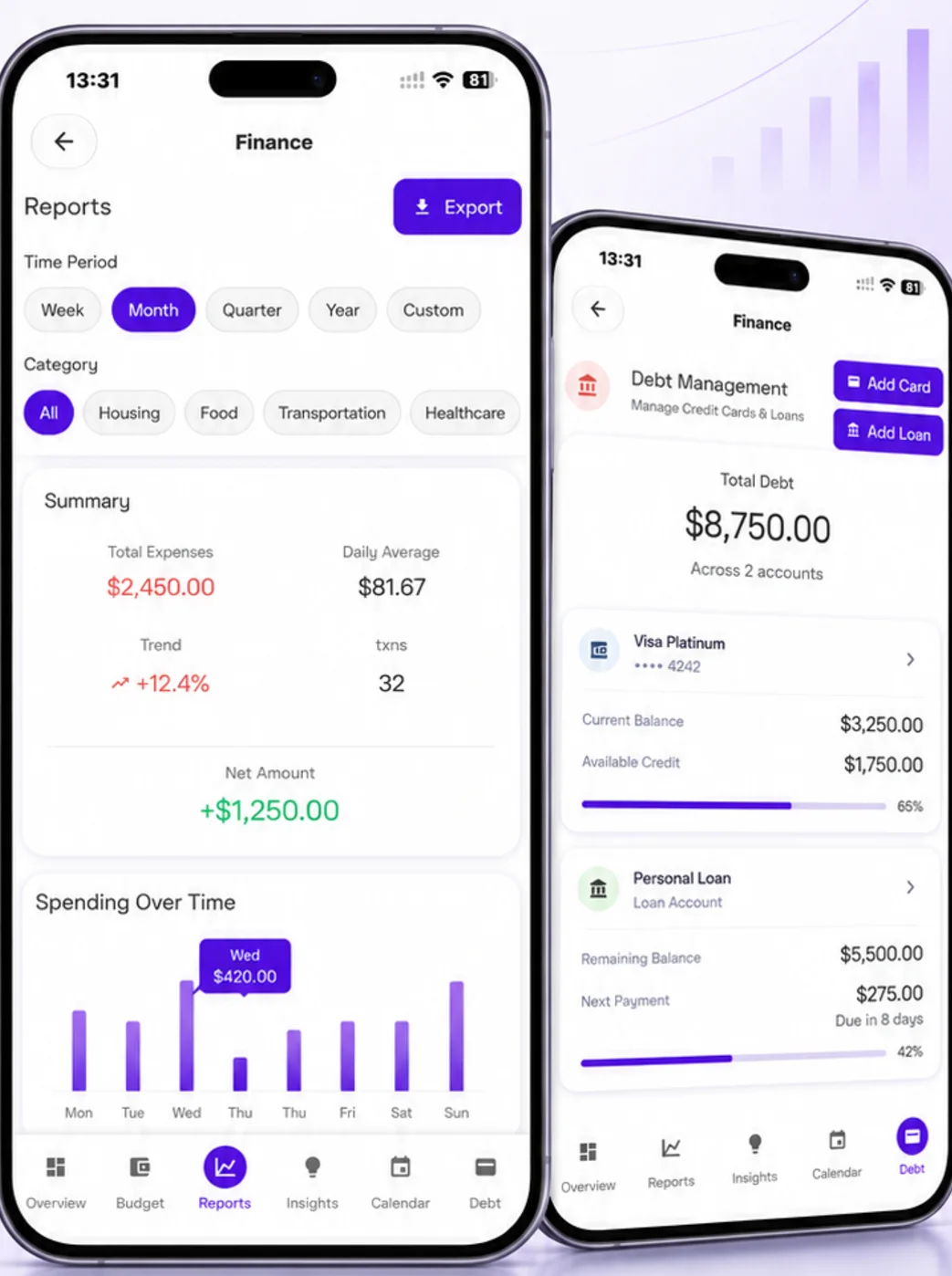
Log an expense with an amount, a description and a category, and say whether it came from cash, a credit card or a gift card. The Money tab shows a cash balance, budgets, reports with a total, a daily average and a transaction count, and a cards-and-loans section. You can export a report as CSV or PDF. The app has no bank connection: every entry is one you made.
- Amount, description, category and payment method for each expense
- Budget, Reports, Calendar and Cards & loans tabs
- CSV and PDF export from Reports
Widgets and a built-in game
Add a Home Screen widget to check today's habits without opening the app (iOS 18 or later). Finishing habits also raises your damage bonus and earns Rewards points and flights in Starforge, a built-in arcade shooter on the Play tab. It is a reward for consistency, not a separate app.
- Home Screen widgets require iOS 18 or later
- Starforge, reached from the Play tab
Privacy: what stays on your phone
Habits, expenses and progress are stored on your device only. There is no account and no HabitForge server holding your data, and the App Store privacy label reads "Data Not Collected". Optional AI insights are off unless you add your own Google Gemini API key; if you do, only the habit or expense text you are looking at is sent to Google to produce that suggestion.
Practical details
- No cross-device sync. Data does not move to a new iPhone on its own, so export your data before switching phones.
- Home Screen widgets need iOS 18 or later, even though the app runs on iOS 15.1.
- Expenses are entered manually, with no bank connection.
Questions
Does HabitForge need an account?
No. There is no sign-up, and nothing is uploaded to a HabitForge server.
Does it use AI?
Pattern-based suggestions use your local completion history. Pro includes deeper, optional Gemini insights using a personal API key.
Can I move my data to a new phone?
Habits and expenses are stored per device. Pro includes financial and calendar exports, which you can save before switching phones.
How much does it cost?
HabitForge is free to download. A one-time Pro purchase unlocks unlimited habits, the full finance tools, calendar export, the expense widget, all themes, and AI features. Check the App Store for local prices.
Which devices does it run on?
iPhone with iOS 15.1 or later. The App Store also lists iPad and, for Apple silicon Macs, a version that is not verified for macOS.
View HabitForge on the App Store
Last verified 2026-11-18 against: App Store version history and app listing (v3.1.0) for current availability and purchase options; app source and support material for technical details..